Archive for December, 2008
Checkpoint Firewall-1 and The SIP Protocol
You have an asterisk based VoIP phone system sitting on an internal network and you are trying to establish connectivity to a SIP-based trunk provider.
You configure a static NAT entry 1-to-1 for the asterisk box and allow the SIP (udp 5060) through the firewall, but SIP registration fails constantly.
While troubleshooting the issue you observe some strange behavior in the NAT. The SIP registration packet (source port 5060, destination port 5060) reaches the firewall, changes the source port at the interior interface and to another high port at the exterior interface, but the answer packet will not be translated correctly.
Fw monitor shows the following:
a.b.c.d is the internal (private) IP address
n.n.n.n is the external (public) IP address
w.x.y.z is the SIP providers IP address
eth1.10:i[502]: a.b.c.d -> w.x.y.z (UDP) len=502 id=0 UDP: 5060 -> 5060 eth1.10:I[502]: a.b.c.d -> w.x.y.z (UDP) len=502 id=0 UDP: 17973 -> 5060 eth0:o[502]: a.b.c.d -> w.x.y.z (UDP) len=502 id=0 UDP: 17973 -> 5060 eth0:O[510]: n.n.n.n -> w.x.y.z (UDP) len=510 id=0 UDP: 40625 -> 5060 eth0:i[404]: w.x.y.z -> n.n.n.n (UDP) len=404 id=5495 UDP: 5060 -> 40625 eth0:I[398]: w.x.y.z -> a.b.c.d (UDP) len=398 id=5495 UDP: 5060 -> 17973 eth1.10:o[398]: w.x.y.z -> a.b.c.d (UDP) len=398 id=5495 UDP: 5060 -> 17973 eth1.10:O[398]: w.x.y.z -> a.b.c.d (UDP) len=398 id=5495 UDP: 5060 -> 17973
As it can be seen the reply does not get translated back as it should to destination port 5060 and thus will not be accepted by the asterisk box.
To understand and be able to solve the current dilemma its imperative that we explore why the Checkpoint Firewall is behaving this way and preventing our Asterisk box from registering the SIP trunk.
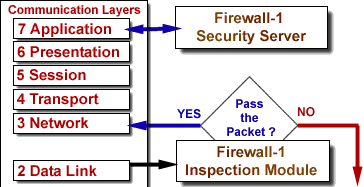
The Stateful Inspection Technology implements all the necessary firewall capabilities at the network level. The FireWall-1 Inspection Module accesses and analyzes data derived from all communication layers. The FireWall-1 Security Server enables the system administrator to define a Security Policy on a per-user basis.
The Inspection Module is located between the Data Link (IP-Stack) and Network Layer (Device Driver). Authentication and Content Security are provided by a suite of FireWall-1 Security Servers, running at the application layers.
![]() |
||
The Security Servers enforce Content Security and Authentication for a particular service. Defining a protocol type within an associated service invokes specific protocol handlers enabling a higher level of security by parsing the protocol, and a higher level of connectivity by tracking dynamic actions and these checks are mostly overridden by SmartDefense checks.
So to recap. As the data moves up the OSI layers, it can be intercepted by both the Security Servers and SmartDefense. In this particular case the protocol definition which invokes specific protocol handlers are modifying the reply SIP packets during translation using a random port and not the UDP 5060 asterisk is expecting.
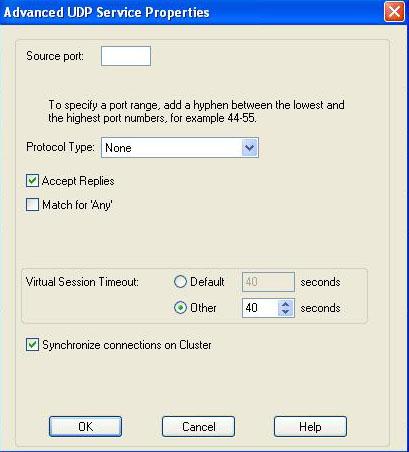
Modifying the Protocol Type on the udp-sip service under the “Advance UDP Services Properties” from SIP_UDP to None will solve the issue.
VoIP Phone Systems for Small Businesses
The more I research on the potential and possibilities of VoIP phone systems, the more companies I see trying to get a piece of the market.
Reminds me of a blog entry I read recently “Everything I Know About Business I Learned From Poker” and more specifically the quote: “If there are too many competitors (some irrational or inexperienced), even if you’re the best it’s a lot harder to win.” which definitely rings true here.
Below is a partial list of VoIP phone systems geared towards small businesses, meaning deployments of less than 50 phones. Although several of these systems can easily scale into the hundreds of phones.
- PhoneBochs from Rochbochs, Inc. (Duluth, MN based Rochbochs builds appliances based on Linux ranging from firewalls, asterisk telephony, Zimbra Email Collaboration and Fax over IP.)
- GXE502X from Grandstream. (Brookline, MA based Grandstream builds the GXE502x appliance, a powerful all-in-one voice + video + fax + data communication solution for the small to medium sized business)
- Jazinga PBX from Jazinga. (Toronto based Jazinga integrates data networking, traditional telephone service and low-cost Voice-over-IP (VoIP) service into one simple solution for small business and homes)
- Response Point from Microsoft. (Redmond, WA based Microsoft could not miss the action and introduced their next generation phone system for small businesses.)
- Trixbox from Fonality. (Los Angeles, CA based Fonality who acquired Trixbox which itself was re-branded from the open source project Asterisk @Home brings both software and appliance offerings to the table going beyond the small business market.)
- Switchvox IP PBX from Digium. (Huntsville, AL based Digium and the cradle of Asterisk brings forth their flagship product Switchvox which is probably one of the most popular offerings out there today.)
- TalkSwitch from Centrepoint Technologies. (Canada based Centrepoint, now TalkSwitch provides telecommunications solutions ideal for small and multi-location businesses with up to 32 telephone users per office.)
- PIKA WARP by PIKA Technologies. (Ontario, Canada based PIKA builds appliances focused on Asterisk and Linux solutions for small businesses.)
- BYOB by yourself. (Locally based, you can “Build Your Own Box” using Sangoma or Digium hardware for POTS landlines and build your own VoIP phone system using any Asterisk distribution, including Trixbox®, Elastix, AsteriskNOW, Elastix, CentPBX, and PBX-in-a-Flash, or FreeSWITCH, or YATE.
Amongst the other options available are the hosted solution where you pay a fixed cost per device, and then there’s the Colo solution where you would have one of the options above hosted by someone else.
There are many variables that need to be taken into account and every business is different.
Small businesses are likely to have some type of broadband connectivity to the Internet, whether cable or DSL and not the more reliable T1 circuit. Although I have not had any problems with my broadband connection for over 3 years, I have seen businesses add redundant cable and/or DSL because they have to stay up when their service gets interrupted occasionally during a storm.
The amount of simultanous calls at any one time and the codec used will also play a role in deciding if the hosted solution is viable, since most broadband providers do not offer symmetrical upload and download speeds but rather assimetrical where the upload is usually much lower than the download speeds.
My rule of thumb for a business with more than 10 phones and 3 lines with heavy phone usage is to stay with the premises PBX and only use VoIP trunks as secondary circuits for savings.
Monitoring VoIP Trunks
Using VoIP lines to save on long distance and/or international calls is smart but real savings come in when you are able to dump your landline and go all the way with VoIP.
Over the years the technology has matured to the point where its possible to provide reliable phone service over the Internet. Vonage being a pioneer in this market and recently major telcos offering this service to their existing client base has begun to erode the excepticism on VoIP.
When migrating for landline to VoIP its very important for the service to just work. People expect the phone to have a dial tone when its picked up just as they expect the lights to come on when the switch is flipped. It has become a utility.
Even though VoIP has come a long way, its important to keep an eye on it. Because voice now travels the same path that data those, there is a wide variety of tools available to measure and monitor performance and availability.
The script below allows you to e-mail you the status of a SIP or IAX trunk on an asterisk based VoIP phone system. The script scheduled every 5 minutes would check the status of the registration status for the specific trunk.
We being by creating two files in the /etc/asterisk directory.
- trunkalerts_iax.txt
- trunkalerts_sip.txt
Each file contains the registration domain and port as shown when querying sip and iax registrations.
Example of trunkalerts_sip.txt
sip.broadvoice.com:5060
Script: (download here)
#!/usr/bin/perl
################################################## #############################
##################### ###########################
####
#### Trunk Alerts script written by Jim Hribnak Oct 7th 2007
#### if there is any questions please feel free to drop me an email at jimh at d
omain nucleus.com
#### Called using Cron job
################################################## #############################
##################### ###########################
####
#### Create the following 2 files in /etc/asterisk
####
#### in the files below add the hosts entry from asterisk -rx “sip show registry
” and
#### from asterisk -rx “iax2 show registry”.
####
open(IAXTRUNKS,”/etc/asterisk/trunkalerts_iax.txt”);
open(SIPTRUNKS,”/etc/asterisk/trunkalerts_sip.txt”);
################################################## #############################
##################### ###########################
####
#### SIP Related Code
####
#print “================================================= ===========\n”;
#print “SIP Trunk information\n”;
#print “================================================= ===========\n”;
while (<SIPTRUNKS>) {
chomp;
$siptrunks = `/usr/sbin/asterisk -rx “sip show registry” |grep \”$_\” | awk ‘{pr
int $4}’`;
#print “siptrunks = $siptrunks\n”;
if ($siptrunks =~ “Registered”) {
#print “$_ is up\n” ;
} else {
#print “We have a problem\n”;
print “$_ trunk is not registering\n”;
mailalert();
}
} #end of while loop (read SIP file)
################################################## #############################
##################### ###########################
####
#### IAX Related Code
####
#print “\n\n============================================= ===============\n”;
#print “IAX2 Trunk information\n”;
#print “================================================= ===========\n”;
while (<IAXTRUNKS>) {
chomp;
$iaxtrunks = `/usr/sbin/asterisk -rx “iax2 show registry” |/bin/grep \”$_\” | aw
k ‘{print $5}’`;
#print “iaxtrunks = $iaxtrunks\n”;
if ($iaxtrunks =~ “Registered”) {
#print “$_ is up\n” ;
} else {
mailalert();
print “We have a problem\n”;
print “$_ trunk is not registering\n”;
my $subject = “Subject: TRUNK $iaxtrunks is DOWN!!!!\n”;
my $content = “TRUNK $iaxtrunks is DOWN!!!!\n”;
}
} #end of while loop (read SIP file)
################################################## ########################
####
#### Email Subroutines
#### Change anywhere below where there is an email address an email addres
#### must have \@ as perl needs to escape the @ symbol
####
################################################## ########################
sub mailalert {
my $sendmail = “/usr/sbin/sendmail -t”;
my $from= “FROM: <pbx\@sekiur.com>\n”; #replace xxx with your FROM email ID
my $reply_to = “Reply-to: <support\@sekiur.com\n”;
my $subject = “Subject: $_ is DOWN!!!!\n”;
my $content = “TRUNK $_ is DOWN!!!!\n”;
my $send_to = “To:<support\@sekiur.com>\n”; #replace xxx with your TO email ID
open(SENDMAIL, “|$sendmail”) or die “Cannot open $sendmail: $!”;
print SENDMAIL $from;
print SENDMAIL $reply_to;
print SENDMAIL $subject;
print SENDMAIL $send_to;
print SENDMAIL $content;
close(SENDMAIL);
#log
my $logfile = “/var/log/asterisk/trunkfailure.log”;
my $date = localtime();
my $logmsg = “$date TRUNK $_ is down”;
open LOGFILE, “>>$logfile” or die “cannot open logfile $logfile for append: $!”;
print LOGFILE $logmsg, “\n”;
close LOGFILE;
print “An email has been sent!\n\n”;
}
Anonymizing Web Traffic
I recently wrote about Secure Internet Browsing and the need for it. Not too long thereafter I found an instance were you might want to make sure that your traffic is anonymous so I will take a closer look at “Onion Routing” and “Tor”.
Tor is a software project that helps you defend against traffic analysis, a form of network surveillance that threatens personal freedom and privacy, confidential business activities and relationships, and state security. Tor protects you by bouncing your communications around a distributed network of relays run by volunteers all around the world: it prevents somebody watching your Internet connection from learning what sites you visit, and it prevents the sites you visit from learning your physical location. Tor works with many of your existing applications, including web browsers, instant messaging clients, remote login, and other applications based on the TCP protocol.
There are several ports of the “Tor” project out there and after evaluating several of them the better one seems to be the Vidalia-Tor-Privoxy Bundle here.
There are several components in this package that warrant explanation.
The Vidalia application is a GUI program to access Tor.
Then we have Tor which uses cryptography in a layered manner working at the TCP stream level as opposed to using application layer solutions like anonymous proxies. Is important to note that Tor (onion routing) is designed to anonymize traffic and does NOT secure it. Additionally there could be some weaknesses that I will address later on DNS leaks, IP address leakage and cookie leakage.
The next component of the bundle is Privoxy which is a non-caching web proxy with advanced filtering capabilities for enhancing privacy listening on port TCP 8118. Privoxy receives requests from the web browser and then forwards web traffic to through the Tor network for anonymity. Tor sits on your PC listening on port TCP 9050 ready to scrub the traffic clean from traffic analysis.
Finally there is TorButton (add-on) which enables Firefox users to enable/disable the use of Tor by the browser with just one click.
I chose not to select this during the install since it has mixed reviews due to bugs and decided to go with a much better add-on called QuickProxy.
There is little you need to do to the default install. You should see Privoxy running on your “Systray” as a blue “P” icon and next to it you should see a “green onion” icon. Clicking on the “green onion” will bring up the Vidalia Control Panel so you can connect to the Tor network.
The last thing that needs to be done is to configure your browser to point to the local proxy (Privoxy) running on your PC as shown below.
Click on the Image to enlarge.
At the button of your Firefox browser you should see a Green/Red “P” (QuickProxy) which determines if the proxy is selected or not.
Finally to test if your browser is anonymized. Make sure your Firefox status bar shows the Red “P” and go to http://www.ipchicken.com to determine your IP address. Click on the “P” icon and watch it turn to green and then proceed to refresh your browser and your IP address should change to something random.

Now lets look at the weaknesses starting with DNS leaks.
The Problem: When your applications connect to servers on the Internet, they need to resolve hostnames that you can read (like www.torproject.org) into IP addresses that the Internet can use (like 209.237.230.66). To do this, your application sends a request to a DNS server, telling it the hostname it wants to resolve. The DNS server replies by telling your application the IP address.
Clearly, this is a bad idea if you plan to connect to the remote host anonymously: when your application sends the request to the DNS server, the DNS server (and anybody else who might be watching) can see what hostname you are asking for. Even if your application then uses Tor to connect to the IP anonymously, it will be pretty obvious that the user making the anonymous connection is probably the same person who made the DNS request.
Using Tor in concert with Privoxy pretty much takes care of this, since its a socks4a-capable HTTP proxy but if you intend to anonymize other non-SOCKS aware applications (for instant messaging, Jabber, IRC, etc), that are connected directly to Tor using SOCKS 4 of SOCKS 5 you will be prone to DNS leaks and not be as anonymous as you might think.
The Tor project is working to resolve this in their next release by including a DNS resolver that will send queries over the mixed network.
Alternatively you can modify how Firefox performs DNS lookups which is generally done by handing down the request to the operating system.
To force DNS requests into the Tor channel, visit the special URL
about:configand find the keynetwork.proxy.socks_remote_dns. Set it totrue
Now what about cookie leakages.
Websites are allowed unless specifically told otherwise to store bits of information on your PC, to determine its you the next you visit. This allows for a more fluent and pleasant experience on any site you log into.
Now when you want to disassociate yourself from your identity it presents a problem. When you visit a website that has already placed a cookie on your computer and then you visit it again with your Tor identity, the website can determine that even though the originating IP addresses are different, it is in fact the same person. Making sure you have a second Firefox account or have erased your cookies becomes paramount to maintain your identities separate.
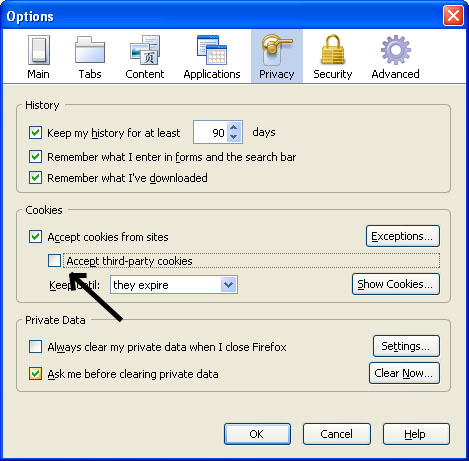
Additionally you have to worry about cross-site cookies which can be solved by allowing cookies for the originating website only, and have them kept only until Firefox is closed as seen below.
Click on the Image to enlarge.
Finally a word on security.
As Tor relies on a network of people around the world serving as relays to the traffic, you can easily see how a particular request to a website sending over a clear channel a username/password combination might be problematic. Someone actually listening (Tor Relay) to the traffic relayed through them will be able to pick up this information.
Even worse scenario would be someone phishing for information at an exit node and pretending to be a website you are visiting.
The most simple solution for this is to only use SSL and forcing Firefox to tell you if you are about to send information to an un-encrypted website.
Turn on warnings for secure and insecure sites. At the Firefox configuration URL about:config, find the keys beginning with security.warn_. Set all of them to true, except for the once ending in .show_once, which should be set to false. Then set security.warn_entering_secure to false — you really don’t need to be alerted to that.
If you visit a site and the browser tells you that the SSL certificate may be invalid, don’t trust it!
Sources:
Wikipedia
The Tor Project
Security Conferences
It is my intention next year to attend at least a couple of security conferences if not more.
Below is a list of the most established and ones I found attractive.
CSI

The largest information security conference on the East Coast is also the only security conference expressly assembling experts to challenge the status quo.
CSI thinks that we should forget about tweaking the status quo. We’re already well into a post-perimeter world but without a consensus on the strategic plan moving forward. It’s time to grapple with the issues and technologies that can radically alter the way security works-now, and in the months and years ahead.
Defcon
It’s the largest underground hacker convention in the world!
When: July 31 – August 2, 2009
Where: Riviera Hotel & Casino in Las Vegas, Nevada, USA
Cost: $100 (USD) NB. It’s cash only. (free if you’re a full badge Black Hat attendee)
Black Hat
The Black Hat Briefings are a series of highly technical information security conferences that bring together thought leaders from all facets of the infosec world – from the corporate and government sectors to academic and even underground researchers. The environment is strictly vendor-neutral and focused on the sharing of practical insights and timely, actionable knowledge. Black Hat remains the best and biggest event of its kind, unique in its ability to define tomorrow’s information security landscape.
When: Various
Where: Las Vegas, Amsterdam, Tokyo, Washington DC
Cost: Varies
SecTor
SecTor brings the world’s brightest (and darkest) minds together to identify, discuss, dissect and debate the latest digital threats facing corporations today. Unique to central Canada, SecTor provides an unmatched opportunity for IT Professionals to collaborate with their peers and learn from their mentors. Held at the Metro Toronto Convention Centre in downtown Toronto, SecTor runs two full days. The event features Keynotes from North America’s most respected and trusted experts. Speakers are true security professionals with depth of understanding on topics that matter. SecTor is a must attend event for every IT Professional.
When: October 5-7, 2009
Where: Toronto, Ontario, Canada
Cost: Early Bird: $499, Standard: $749, Full: $999 (CDN)
ShmooCon
ShmooCon is an annual East coast hacker convention hell-bent on offering three days of an interesting atmosphere for demonstrating technology exploitation, inventive software & hardware solutions, and open discussions of critical infosec issues. The first day is a single track of speed talks, One Track Mind. The next two days, there are three tracks: Break It!, Build It!, and Bring It On!.
When: February 6-8, 2009
Where: Wardman Park Marriott, Washington DC, USA
Cost: From $100-$300
Chaos Communication Congress
The Chaos Communication Congress is an international, five-day open-air event for hackers and associated life-forms. The Camp features two conference tracks with interesting lectures, a workshop-track and over 30 villages providing workshops and gettogethers covering a specific topic.
When: December 27th to 30th, 2008
Where: bcc Berliner Congress Center, Berlin, Germany
Cost: 130 € – 1500 €
Toorcon
ToorCon is San Diego’s hacker conference bringing together the top security experts to present their new tricks of the trade and have fun in the sunny and beautiful city of San Diego.
When: September 2009
Where: San Diego, California, USA
Cost: From $120-$200
HITB Security Conference
The main aim of our conferences is to enable the dissemination, discussion and sharing of network security information. Presented by respected members of both the mainstream network security arena as well as the underground or black hat community, this years conference promises to deliver a look at several new attack methods that have not been seen or discussed in public before.
When: Various
Where: Dubai, Malaysia
Cost: Varies
Phreaknic
PhreakNIC is an annual gathering in Nashville, TN, for hackers, makers, security professionals, and general technology enthusiasts. Hours upon hours of both informative and entertaining presentations are given by volunteers and many areas are set up with the intent of encouraging socialization.
When: October 2009
Where: Nashville, Tennessee, USA
Cost: $25
SANS
SANS provides intensive, immersion training designed to help you and your staff master the practical steps necessary for defending systems and networks against the most dangerous threats – the ones being actively exploited. The courses are full of important and immediately useful techniques that you can put to work as soon as you return to your offices. They were developed through a consensus process involving hundreds of administrators, security managers, and information security professionals, and address both security fundamentals and awareness, and the in-depth technical aspects of the most crucial areas of IT security.
When: Various
Where: Various
Cost: Varies
Techno Security Conference
TheTrainingCo. is both new and old. As a corporation, it is the culmination of a dream that we have been sharing with people for the past decade. In that sense, it is new. We officially opened our doors in early 1999.
We are old in that the experiences of our senior staff are almost unmatched in their knowledge of the subjects being addressed at our conferences and speaking engagements. Every bit of that hard earned knowledge came as a result of years of highly specialized work and contact with thousands of people. Our two senior members alone bring more than one half of a century of pioneering efforts in the fields of Techno-Security and Cyber-Crime Prevention.
When: May 31 – June 3, 2009
Where: Myrtle Beach, SC, USA
Cost: $895
CEIC Conference
CEIC offers lectures and hands-on labs delivered by industry-leading experts, which gives attendees the opportunity to learn the latest techniques and methodologies in computer forensics, eDiscovery, incident response and enterprise investigations.
When: May 17-20, 2009
Where: Loews Royal Pacific Resort, Universal Orlando, USA
Cost: $895
IntrusionWorld Conference
The IntrusionWorld Conference & Expo is the forum for business and corporate executives, Industry, government, legal and academic experts that aim to present the state-of-the-art of the practice, emerging technologies in intrusion prevention. Peer-to-peer groups will help us understand the trends and confront the challenges inherent in today’s intrusion prevention technologies, products, systems implementation and risk management. Field practitioners will exchange best practices and lessons learned. Participants will share ideas and expand business and professional contacts during lunch roundtables, workshops, receptions and other activities.
When: May , 2009
Where: Baltimore, MD, USA
Cost: $875
The Last Hope
We all knew these days would come. The Last HOPE is the seventh Hackers On Planet Earth conference.
When: July, 2009
Where: Hotel PennSylvania, New York, USA
Cost: $
RSA Security Conference
In information security, you’re trained to expect the unexpected. Changes occur in a nanosecond. Stay on top by staying one step ahead — attend RSA® Conference 2008!
Join us for the most comprehensive forum in information security. Come learn about the latest trends and technologies, get access to new best practices, and gain insight into the practical and pragmatic perspectives on the most business critical issues facing you today.
Connect and collaborate. Build your professional network. And mingle with 17,000 of the industry’s best and brightest.
When: April 20-24, 2009
Where: Moscone Center, San Francisco, California, USA
Cost: From $1495 – $3295
Info Security Canada
When it comes to your critical information – it’s not a question of if it’s at risk, it’s a question of when. Stay in front of the fast, ever changing information security curve, at Infosecurity Canada 2008, your first and best line of defense.
When: June, 2009
Where: Toronto, Ontario, Canada
Cost: TBD
Web Conferencing With Dimdim
For a while I’ve been wanting to write several articles on the power of open source and its potential covering multiple software applications that I have run into and this is definitely on of those cases.
In this economical downturn, the use of open source will be more attractive than ever as a strategy to keep costs under control when being asked to do more with less.
This industry was defined and dominated by a company called Webex in the mid nineties which was later acquired by Cisco Systems. Although a very powerful application, it remained accessible to only those who could afford its high price tag.
Over the years several companies tried unsuccessfully to dethrone Webex, which remained intact most probably due to its reliability and stability.
In 2004, Citrix Systems brought the capability of performing web conferencing to the desktop cornering an untapped consumer/smb market and reigning king.
At the time GoToMeeting emerged, WebEx, LiveNote and others catered mostly to large corporations and sales divisions, entering in six-figure contracts. Citrix Online released GoToMeeting on an “all you can meet” basis, with one monthly (or annual charge) based on the number of authorized hosts. This pricing model was unique at the time, but has since been copied by competitors.
Late 2006 I started looking at open source alternatives to the Webex’s of the world and stumbled upon Dimdim while browsing through the goldmines of Freshmeat and Sourceforge.
The software at that point was still in alpha version 1.6. Installation was pretty straight forward once tomcat was installed and a plus was the possibility of integration with Moodle, an open source Course Management System (CMS).
Unfortunately the stability of the package was not there. Another package I looked at was Yugma which is a web based web conferencing service. Again it just wasn’t there.
Two years later and Dimdim has gone from Alpha to Beta and now Dimdim has exited Beta with version 4.5.
Dimdim‘s installation is far more complicated than earlier versions requiring several Python packages, and building and compiling other applications that support Dimdim. My first attempt at performing the installation was unsuccessful but a VM Appliance which is also provided under GPL3 license came up without a hitch.
The web service Dimdim works right out of the box and appears to be reliable and stable. Scalability will be my next test on this VMware appliance with 1Gb of RAM, to determine if it can handle 2-3 conferences and upward of 50 users.
Promising features include integration with other open source industry leaders.
Dimdim’s commitment to open source software development is supported by integrations with industry-leaders:
- Zimbra: Dimdim now offers a free zimlet for Zimbra’s open source email system;
- Moodle: Dimdim is integrated with version 1.9 of Moodle’s Course Management System;
- SugarCRM: Dimdim is integrated with the leading open source customer relationship management system,
- Claroline: Dimdim is embedded within with the collaborative learning environment.
Secure Internet Browsing
Just read an article over at Internet News – Which Top Apps Have the Most Security Holes? and to my surprise Firefox was right up there on first place.
I consider myself a pretty safe Internet surfer, doing the obvious and making sure that I do not visit a website that could put my PC at risk.
A long time ago when I started to use Firefox and became a fan hooked on add-ins and tabbed browsing, I decided to continue to use Internet Explorer exclusively for banking. On the Firefox side I also take preventative measures including a couple of add-ins which I think are critical. The first is Adblock Plus and the second is NoScript.
This practice makes even more sense now, although I constantly make sure that I keep up with security updates.
For enterprises, the fact spells trouble — especially since many of these apps slip in without IT knowing. Additionally, the news comes as businesses face growing security threats, punctuated by a slew of recent data breaches, while also contending sharply reduced spending on IT projects.
What is surprising is that Microsoft showed up at number 10 with only Microsoft Windows Live Messenger. I have to say that Microsoft has done a superb job and mastered patch deployment and as long as you have an Internet connection and automatic updates turned on you’re half way there.
Additional measures I have decided not to take is to privatize my Internet browsing. A couple of popular practices are to tunnel your browsing through your home Internet connection in order to prevent your employer from snooping or blocking web traffic and the other is to anonymize the traffic either by going through a proxy or using a product that will rotate source IP addresses every time a connection is made (onion routing), making it virtually impossible to analyze the traffic.
Unfortunately I believe that once you get online, there is really no way to cover your tracks. There is nothing that isn’t traceable and if someone wants to find you bad enough they will so keep it legal.
Configuring Google Apps for Your Domain
In my previous post here, I went into the steps needed to bring up a Microsoft Live Exchange Labs environment.
Previously we had discussed the different options available when it came to hosted E-mail here.
Setting up a Google environment can be done it one of two ways. You can choose to maintain your existing domain to which e-mail is currently being delivered to or you can setup a completely new one like gapps.your-domain.com.
Allowing to pilot their offering using your existing domain sets you up for an easier migration path, if you choose to go with Google and this is the path which will be described below.
Once again after receiving a requested invitation from Google, we proceed to re-route e-mail.
Pilot Google Apps with email routing instructions are here.
Once you have verified your domain proceed to create an additional MX record in your DNS pointing to your existing mail server. This will be needed because as you route all your mail to Google, they will need to send e-mail back your way to accounts that do not exist in Google Apps.
- DNS Record Type: MX
- Host: routing.your-domain.com
- MX server: server1.your-domain.com (your E-mail server “A” record)
- TTL: 3600 or 1 hour
- Priority: 0 (or High priority)
Setup Google to route e-mail back to your server.
- Navigate to the Email settings page in the control panel. In the Email routing section, the default destination is Google Apps Email.
- Click Add another destination to set up mail routing for your other system.
- Enter the MX record you created previously. routing.your-domain.com
- Deliver mail for: Select Unknown accounts only to route mail to email addresses that don’t exist in your Google Apps account.
- Change SMTP envelope: Uncheck the box since your other mail system is already configured to receive mail addressed to this domain.
- Save changes
Then you will need to change your MX records to route e-mail sent to your domain to Google mail servers.
Your configuration would go from something like this:
- DNS Record Type: MX
- Host: mail.your-domain.com
- MX server: server1.your-domain.com (your E-mail server “A” record)
- TTL: 3600 or 1 hour
- Priority: 0 (or High priority)
to this
| Priority | Mail Server |
|---|---|
| 1 | ASPMX.L.GOOGLE.COM. |
| 5 | ALT1.ASPMX.L.GOOGLE.COM. |
| 5 | ALT2.ASPMX.L.GOOGLE.COM. |
| 10 | ASPMX2.GOOGLEMAIL.COM. |
| 10 | ASPMX3.GOOGLEMAIL.COM. |
You are all set. As you create accounts in Google Apps, e-mail will be routed to their servers and e-mail will be delivered to those accounts. Any accounts non-existent will be routed back to the original e-mail server.
The diagram below makes it easier to understand.
Again there are lots of customizations including adding CNAME entries to your DNS allowing you to change the URL users will use to access e-mail and all the other options.
Configuring Microsoft Windows Live Exchange Labs
When it comes to decision making having data to make the right choice is paramount.
Creating a pilot program provides invaluable feedback from users as to the functionalities that a specific product provides and making them part of the selection process improves the success of a project greatly.
Today we will be looking at Microsoft’s e-mail hosted solution, more specifically Exchange Labs which is described in detail in a previous post here.
Once you get an invitation from Microsoft which you have to request, you will go to their administrative console http://domains.live.com. After the domain is created, the game beings and we start playing with DNS records. We will address BIND specific configurations, but these same settings will apply to other DNS servers.
The easiest way to begin is to setup a new zone named live.your-domain.com.
An MX record will need to be created pointing to the exchangelabs.com domain and the specific entry will be provided by the administrator console.
- DNS Record Type: MX
- Host: live.your-domain.com
- MX server: number_provided.mail.exchangelabs.com
- TTL: 3600 or 1 hour
- Priority: 0 (or High priority)
Create a CNAME entry to allow Outlook 2007 client to connect to Exchange Labs.
- DNS Record Type: CNAME
- Host: autodiscover
- Value: autodiscover.exchangelabs.com
Configure Sender ID to allowing destination mail servers to trust mail originating from your domain using the Sender Policy Framework (SPF).
- DNS Record Type: TXT
- Host: live.your-domain.com
- Value: v=spf1 include:exchangelabs.com ~all
- TTL: 3600 or 1 hour (if requested)
Finally if you want to have federated Windows Live Messenger access, you will need to create a SRV record.
- DNS Record Type: SRV
- Host: _sipfederationtls._tcp.live.txwes.edu
- Value: 10 2 5061 federation.messenger.msn.com
Now to test the configuration you can use DNSWatch to test your records to see how the world sees your servers. Keep in mind that it could take hours for your records to propagate throughout the Internet.
Finally there are several options for you to customize the look and feel of your hosted e-mail.
You will be able to reach the site by going to http://autodiscover.live.your-domain.com or you can enter an additional CNAME entry in your DNS which is more significant to you and point it to autodiscover.exchangelabs.com
Apparently creating multiple administrator accounts cannot be done easily on the administrative website, but rather using a tool called PowerShell and promoting existing user accounts. Further limitations include that PowerShell will only run on Vista SP1 and Windows Server 2008.
Instructions on doing this are here and here.