Sekiur My Thoughts

VoIP, Mobility, Security, Open Source, Science, Politics, and Technology.

Archive for the ‘voip’ tag

PBX in a Flash with CBeyond

with one comment

Last week I deployed a PBX in a Flash system using SIPConnect from CBeyond. It was so successful that I will start using PIAF in lieu of Trixbox from now on for all future deployments of this type and will replace my home PBX to take advantage of Skype and Google Voice integration.

In this case I used the Aastra 53i (English edition) VoIP phones which when connected to the network, retrieved an IP from the DHCP server, contacted the PBX using mDNSResponse, checked and downloaded the most recent firmware available on the PBX, and downloaded the default configuration which prompts for a user to login. After login in the phone created a config file on the PBX for future restarts.

These Aastra phones come in 2 editions (The English/American edition and the European edition). The power supply for the European edition has different connectors and the display had symbols instead of words. Apart from that they appeared to be identical but getting the European edition to automatically connect to the PBX and configure itself was very painful, having to reset the phone to factory defaults and erase the local configuration multiple times and finally having to define on the phone the TFTP server (PBX) IP address for it to download the configuration.

Two thumbs up for the PBX in a Flash (PIAF) developers who have done a superb job with this distribution holding up the ideals of the original Asterisk@home open source project.

pbxinaflash

Their documentation was almost flawless although it was difficult trying to find the most recent version of instructions as they are all layed out in bits and pieces across a blog. In pursuit of a perfect install I narrowed down the install to running the iso install, going through the online download and compilation of asterisk and running the update/fix scripts. Now before upgrading/installing any module or OS updates, I downloaded and installed the files necessary to deploy the Aastra phones which is also done by a script and then I proceeded to install/update the software via the FreePBX module admin and finally the OS updates.

Below is the trunk configuration for connecting via SIPConnect to CBeyond from PBX in a Flash:

Outbound caller ID: 5551231234
Never overrride caller ID: checked
Maximum Channels: 6

Outbound Settings

trunk name=cbeyond

allow=ulaw&alaw&gsm&ilbc&g726&adpcm
context=from-trunk
disallow=all
dtmfmode=auto
fromdomain=sipconnect.dal0.cbeyond.net
host=sipconnect.dal0.cbeyond.net
insecure=very
outboundproxy=sip-proxy.dal0.cbeyond.net
qualify=250
secret=[secret-password]
type=peer
username=5551231234

Regitration String: 5551231234:secret-password@cbeyond/5551231234

Note: Notice there is no inbound settings required. DID incoming configuration will determine were each channel from the trunk will ring.

Reblog this post [with Zemanta]

Share and Enjoy:
  • Digg
  • Sphinn
  • del.icio.us
  • Facebook
  • Mixx
  • Google Bookmarks
  • Reddit
  • TwitThis
  • LinkedIn
  • Print
  • HackerNews
  • StumbleUpon

Written by Jose Vicente Ortega

April 19th, 2009 at 10:57 am

Checkpoint Firewall-1 and The SIP Protocol

with 6 comments

You have an asterisk based VoIP phone system sitting on an internal network and you are trying to establish connectivity to a SIP-based trunk provider.

You configure a static NAT entry 1-to-1 for the asterisk box and allow the SIP (udp 5060) through the firewall, but SIP registration fails constantly.

While troubleshooting the issue you observe some strange behavior in the NAT. The SIP registration packet (source port 5060, destination port 5060) reaches the firewall, changes the source port at the interior interface and to another high port at the exterior interface, but the answer packet will not be translated correctly.

Fw monitor shows the following:

a.b.c.d is the internal (private) IP address
n.n.n.n is the external (public) IP address
w.x.y.z is the SIP providers IP address

eth1.10:i[502]: a.b.c.d -> w.x.y.z (UDP) len=502 id=0

UDP: 5060 -> 5060

eth1.10:I[502]: a.b.c.d -> w.x.y.z (UDP) len=502 id=0

UDP: 17973 -> 5060

eth0:o[502]: a.b.c.d -> w.x.y.z (UDP) len=502 id=0

UDP: 17973 -> 5060

eth0:O[510]: n.n.n.n -> w.x.y.z (UDP) len=510 id=0

UDP: 40625 -> 5060

eth0:i[404]: w.x.y.z -> n.n.n.n (UDP) len=404 id=5495

UDP: 5060 -> 40625

eth0:I[398]: w.x.y.z -> a.b.c.d (UDP) len=398 id=5495

UDP: 5060 -> 17973

eth1.10:o[398]: w.x.y.z -> a.b.c.d (UDP) len=398 id=5495

UDP: 5060 -> 17973

eth1.10:O[398]: w.x.y.z -> a.b.c.d (UDP) len=398 id=5495

UDP: 5060 -> 17973

As it can be seen the reply does not get translated back as it should to destination port 5060 and thus will not be accepted by the asterisk box.

To understand and be able to solve the current dilemma its imperative that we explore why the Checkpoint Firewall is behaving this way and preventing our Asterisk box from registering the SIP trunk.

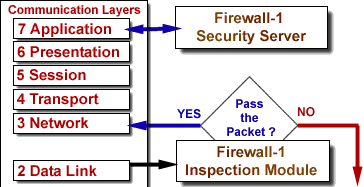
The Stateful Inspection Technology implements all the necessary firewall capabilities at the network level. The FireWall-1 Inspection Module accesses and analyzes data derived from all communication layers. The FireWall-1 Security Server enables the system administrator to define a Security Policy on a per-user basis.

The Inspection Module is located between the Data Link (IP-Stack) and Network Layer (Device Driver). Authentication and Content Security are provided by a suite of FireWall-1 Security Servers, running at the application layers.


The Security Servers enforce Content Security and Authentication for a particular service. Defining a protocol type within an associated service invokes specific protocol handlers enabling a higher level of security by parsing the protocol, and a higher level of connectivity by tracking dynamic actions and these checks are mostly overridden by SmartDefense checks.

So to recap. As the data moves up the OSI layers, it can be intercepted by both the Security Servers and SmartDefense. In this particular case the protocol definition which invokes specific protocol handlers are modifying the reply SIP packets during translation using a random port and not the UDP 5060 asterisk is expecting.

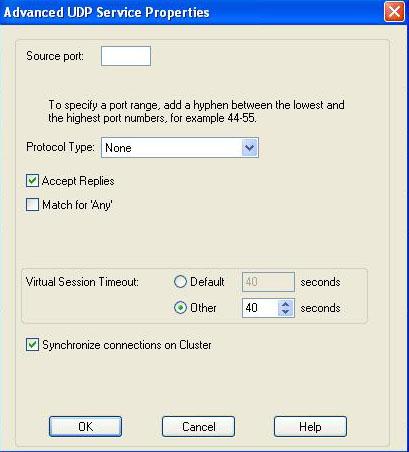
Modifying the Protocol Type on the udp-sip service under the “Advance UDP Services Properties” from SIP_UDP to None will solve the issue.

Share and Enjoy:
  • Digg
  • Sphinn
  • del.icio.us
  • Facebook
  • Mixx
  • Google Bookmarks
  • Reddit
  • TwitThis
  • LinkedIn
  • Print
  • HackerNews
  • StumbleUpon

Written by Jose Vicente Ortega

December 30th, 2008 at 12:58 am

Posted in Security

Tagged with , , , , ,

VoIP Phone Systems for Small Businesses

without comments

The more I research on the potential and possibilities of VoIP phone systems, the more companies I see trying to get a piece of the market.

Reminds me of a blog entry I read recently “Everything I Know About Business I Learned From Poker” and more specifically the quote: “If there are too many competitors (some irrational or inexperienced), even if you’re the best it’s a lot harder to win.” which definitely rings true here.

Below is a partial list of VoIP phone systems geared towards small businesses, meaning deployments of less than 50 phones. Although several of these systems can easily scale into the hundreds of phones.

  1. PhoneBochs from Rochbochs, Inc. (Duluth, MN based Rochbochs builds appliances based on Linux ranging from firewalls, asterisk telephony, Zimbra Email Collaboration and Fax over IP.)
  2. GXE502X from Grandstream. (Brookline, MA based Grandstream builds the GXE502x appliance, a powerful all-in-one voice + video + fax + data communication solution for the small to medium sized business)
  3. Jazinga PBX from Jazinga. (Toronto based Jazinga integrates data networking, traditional telephone service and low-cost Voice-over-IP (VoIP) service into one simple solution for small business and homes)
  4. Response Point from Microsoft. (Redmond, WA based Microsoft could not miss the action and introduced their next generation phone system for small businesses.)
  5. Trixbox from Fonality. (Los Angeles, CA based Fonality who acquired Trixbox which itself was re-branded from the open source project Asterisk @Home brings both software and appliance offerings to the table going beyond the small business market.)
  6. Switchvox IP PBX from Digium. (Huntsville, AL based Digium and the cradle of Asterisk brings forth their flagship product Switchvox which is probably one of the most popular offerings out there today.)
  7. TalkSwitch from Centrepoint Technologies. (Canada based Centrepoint, now TalkSwitch provides telecommunications solutions ideal for small and multi-location businesses with up to 32 telephone users per office.)
  8. PIKA WARP by PIKA Technologies. (Ontario, Canada based PIKA builds appliances focused on Asterisk and Linux solutions for small businesses.)
  9. BYOB by yourself. (Locally based, you can “Build Your Own Box” using Sangoma or Digium hardware for POTS landlines and build your own VoIP phone system using any Asterisk distribution, including Trixbox®, Elastix, AsteriskNOW, Elastix, CentPBX, and PBX-in-a-Flash, or FreeSWITCH, or YATE.

Amongst the other options available are the hosted solution where you pay a fixed cost per device, and then there’s the Colo solution where you would have one of the options above hosted by someone else.

There are many variables that need to be taken into account and every business is different.

Small businesses are likely to have some type of broadband connectivity to the Internet, whether cable or DSL and not the more reliable T1 circuit. Although I have not had any problems with my broadband connection for over 3 years, I have seen businesses add redundant cable and/or DSL because they have to stay up when their service gets interrupted occasionally during a storm.

The amount of simultanous calls at any one time and the codec used will also play a role in deciding if the hosted solution is viable, since most broadband providers do not offer symmetrical upload and download speeds but rather assimetrical where the upload is usually much lower than the download speeds.

My rule of thumb for a business with more than 10 phones and 3 lines with heavy phone usage is to stay with the premises PBX and only use VoIP trunks as secondary circuits for savings.

Share and Enjoy:
  • Digg
  • Sphinn
  • del.icio.us
  • Facebook
  • Mixx
  • Google Bookmarks
  • Reddit
  • TwitThis
  • LinkedIn
  • Print
  • HackerNews
  • StumbleUpon

Written by Jose Vicente Ortega

December 29th, 2008 at 11:10 pm

Monitoring VoIP Trunks

without comments

Using VoIP lines to save on long distance and/or international calls is smart but real savings come in when you are able to dump your landline and go all the way with VoIP.

Over the years the technology has matured to the point where its possible to provide reliable phone service over the Internet. Vonage being a pioneer in this market and recently major telcos offering this service to their existing client base has begun to erode the excepticism on VoIP.

When migrating for landline to VoIP its very important for the service to just work. People expect the phone to have a dial tone when its picked up just as they expect the lights to come on when the switch is flipped. It has become a utility.

Even though VoIP has come a long way, its important to keep an eye on it. Because voice now travels the same path that data those, there is a wide variety of tools available to measure and monitor performance and availability.

The script below allows you to e-mail you the status of a SIP or IAX trunk on an asterisk based VoIP phone system. The script scheduled every 5 minutes would check the status of the registration status for the specific trunk.

We being by creating two files in the /etc/asterisk directory.

  • trunkalerts_iax.txt
  • trunkalerts_sip.txt

Each file contains the registration domain and port as shown when querying sip and iax registrations.

Example of trunkalerts_sip.txt

sip.broadvoice.com:5060

Script: (download here)

#!/usr/bin/perl

################################################## #############################
##################### ###########################
####
#### Trunk Alerts script written by Jim Hribnak Oct 7th 2007
#### if there is any questions please feel free to drop me an email at jimh at d
omain nucleus.com
#### Called using Cron job

################################################## #############################
##################### ###########################
####
#### Create the following 2 files in /etc/asterisk
####
#### in the files below add the hosts entry from asterisk -rx “sip show registry
” and
#### from asterisk -rx “iax2 show registry”.
####

open(IAXTRUNKS,”/etc/asterisk/trunkalerts_iax.txt”);
open(SIPTRUNKS,”/etc/asterisk/trunkalerts_sip.txt”);

################################################## #############################
##################### ###########################
####
#### SIP Related Code
####

#print “================================================= ===========\n”;
#print “SIP Trunk information\n”;
#print “================================================= ===========\n”;

while (<SIPTRUNKS>) {
chomp;
$siptrunks = `/usr/sbin/asterisk -rx “sip show registry” |grep \”$_\” | awk ‘{pr
int $4}’`;

#print “siptrunks = $siptrunks\n”;
if ($siptrunks =~ “Registered”) {
#print “$_ is up\n” ;

} else {
#print “We have a problem\n”;
print “$_ trunk is not registering\n”;
mailalert();

}
} #end of while loop (read SIP file)

################################################## #############################
##################### ###########################
####
#### IAX Related Code
####

#print “\n\n============================================= ===============\n”;
#print “IAX2 Trunk information\n”;
#print “================================================= ===========\n”;

while (<IAXTRUNKS>) {
chomp;
$iaxtrunks = `/usr/sbin/asterisk -rx “iax2 show registry” |/bin/grep \”$_\” | aw
k ‘{print $5}’`;

#print “iaxtrunks = $iaxtrunks\n”;

if ($iaxtrunks =~ “Registered”) {
#print “$_ is up\n” ;

} else {
mailalert();
print “We have a problem\n”;
print “$_ trunk is not registering\n”;
my $subject = “Subject: TRUNK $iaxtrunks is DOWN!!!!\n”;
my $content = “TRUNK $iaxtrunks is DOWN!!!!\n”;

}
} #end of while loop (read SIP file)

################################################## ########################
####
#### Email Subroutines
#### Change anywhere below where there is an email address an email addres
#### must have \@ as perl needs to escape the @ symbol
####
################################################## ########################

sub mailalert {

my $sendmail = “/usr/sbin/sendmail -t”;
my $from= “FROM: <pbx\@sekiur.com>\n”; #replace xxx with your FROM email ID
my $reply_to = “Reply-to: <support\@sekiur.com\n”;
my $subject = “Subject: $_ is DOWN!!!!\n”;
my $content = “TRUNK $_ is DOWN!!!!\n”;
my $send_to = “To:<support\@sekiur.com>\n”; #replace xxx with your TO email ID
open(SENDMAIL, “|$sendmail”) or die “Cannot open $sendmail: $!”;
print SENDMAIL $from;
print SENDMAIL $reply_to;
print SENDMAIL $subject;
print SENDMAIL $send_to;
print SENDMAIL $content;
close(SENDMAIL);

#log
my $logfile = “/var/log/asterisk/trunkfailure.log”;
my $date = localtime();
my $logmsg = “$date TRUNK $_ is down”;
open LOGFILE, “>>$logfile” or die “cannot open logfile $logfile for append: $!”;
print LOGFILE $logmsg, “\n”;
close LOGFILE;

print “An email has been sent!\n\n”;
}

Share and Enjoy:
  • Digg
  • Sphinn
  • del.icio.us
  • Facebook
  • Mixx
  • Google Bookmarks
  • Reddit
  • TwitThis
  • LinkedIn
  • Print
  • HackerNews
  • StumbleUpon

Written by Jose Vicente Ortega

December 22nd, 2008 at 9:28 pm

Posted in Technology

Tagged with , , , ,

Asterisk Success Story

without comments

Just had to pass on what transpired today. I started a Tech Support call to Microsoft Partner Support at 9:05 this morning. The call was initially answered in Redmond by the Partner Group. It was then transferred (via IP) to India for First Level Support – this lasted for two hours, when it was kicked up to another level in tech support, and transferred (Again, via IP) to Montreal, CA. After another half hour, I had to attend a meeting, so the call was transferred (in house) to one of my Techs. He stayed on the line for another 1.5 hours, and then transferred the call back to me.

So at this point, I have had a live call that has been bounced over two continents, and in house over three extensions – this is at the 4-Hour point in the call.

The tech from M$FT then says that he needs a disk placed in the server – I place him on hold and call my contact, who is not there, so I transfer the call to my cel phone, and jump in the car and drive 15 minutes to the customer site. Stick the disk in, and resume troubleshooting on site and on the Cel, which has the call bridged through our Trixbox and out to my cel phone.

Two hours and 48 minutes later, and the M$FT guy is still not done, and my cell phone is going dead. Remote over to my desk at the office, call one of the people at my office and tell them I am giving them the call back, and to transfer it to a desk phone back where I am. I then bring up Flash Operator Panel, and put the call on his desk.

He then does a screened transfer to me, hits the receptionist at the school I am working at, asks for the server room, and when the phone rings and I answer, releases the call back to me!!!

Now, I am back talking to the M$FT guy, with no interruption WHATSOEVER and the call goes on for another 2 hours and 20 minutes!!!! He finally finishes what he was doing, and I sat back and looked at the statistics for the call:

9 Hours, 10 Minutes and 56 Seconds (I looked in the Log)
Three Locations and Two Continents (On the M$FT side)
Three internal Transfers, Two Offsite Transfers, and one Flash Operator Panel Call retrieval from an offsite location!!!!!!

And at no point did the call quality suffer – and all of this on a standard production Trixbox system!

Name me a system you could have done this on this easily!!!!

Source: Trixbox Forums (GSnover)

Share and Enjoy:
  • Digg
  • Sphinn
  • del.icio.us
  • Facebook
  • Mixx
  • Google Bookmarks
  • Reddit
  • TwitThis
  • LinkedIn
  • Print
  • HackerNews
  • StumbleUpon

Written by Jose Vicente Ortega

November 14th, 2008 at 1:13 pm

Posted in Technology

Tagged with , , , ,

Trixbox 2.6 and Sangoma Hardware

without comments

Trixbox (formerly Asterisk At Home – A@H) has definitely come a long since its beginnings in November 2004 and since I started playing around with Asterisk 2 months earlier. The convenience of being able to download an ISO and have a functional PBX in less than an hour was and is amazing.

An excellent resource is Ward Mundy’s blog Nerd Vittles, which I have also followed since early 2005 and has worked on some very cool and interesting projects augmenting Asterisk functionality. Most recently in November 2007, they released PBX In A Flash (PIAF) and have also announced a under $500 appliance with PIAF running on it.

What is Asterisk?

Asterisk is a software implementation of a telephone private branch exchange (PBX) originally created in 1999 by Mark Spencer of Digium. Like any PBX, it allows attached telephones to make calls to one another, and to connect to other telephone services including the public switched telephone network (PSTN) and Voice over Internet Protocol (VoIP) services. Its name comes from the asterisk symbol, “*”.

What is Trixbox?

Trixbox is a turnkey business class PBX voice communication system based on the Open Source Asterisk project. It’s no longer necessary to pay thousands and thousands of dollars for a proprietary phone system. By simply downloading software and installing it on a low end system you can have a powerful, open, and robust pbx system. From small systems with only a couple analog phone lines and extensions to large installs with multiple T1/E1 connections and hundreds of extensions, you can easily use Trixbox to meet your telephony needs.

I believe Trixbox to be the most complete distribution of Asterisk out there, although many of its features might not be used in many cases. On the other side I have heard complaints on the lack of collaboration in adding new features and fixing bugs by the guys at Fonality, which makes it less open as it were.

Parts List:

  • Dell GX-150 with 512MB and 80Gb
  • Sangoma A200 card with 4 FXO ports

Todo List:

  • Upgrade the RAM to 512Mb and the hard drive to 80Gb
  • Install the Sangoma PCI A200 card
  • Insert CD into CD drive and boot from disk
  • Go through wizard and install Trixbox
  • Login to the computer, update Cent OS and download and install the drivers
    • yum update
    • yum upgrade
    • cd /opt
    • wget ftp://ftp.sangoma.com/linux/RPMS/2.6.1.13/wanpipe-util-3.2.7.1-0.i686.rpm
    • wget ftp://ftp.sangoma.com/linux/RPMS/2.6.1.13/wanpipe-modules-2.6.18-53.1.4.el5-3.2.7.1-0.i686.rpm
    • wanrouter hwprobe
    • wanrouter hwprobe verbose
    • setup-sangoma
      • When asked which codec will be used, select MULAW – North America
      • When configuration of the analog card completes, select 1 to continue
      • When configuration of Zaptel and Wanpipe completes, select 1 to save and restart deamons
      • When asked to start wanrouter at boot time, select 1 for yes
    • ztcfg -vv (to display the analog card installed and its modules.)
  • Install DynDNS client:
    • Install DAG’s GPG key
      • rpm –import http://dag.wieers.com/rpm/packages/RPM-GPG-KEY.dag.txt
    • Verify the package you have downloaded
      • rpm -K rpmforge-release-0.3.6-1.el5.rf.*.rpm
    • yum install ddclient
  • Create DynDNS account
  • Configuration ddclient: (Add to the end of the /etc/ddclient/ddclient.conf file)
    • use=web, web=checkip.dyndns.com/, web-skip=’IP Address’
    • server=members.dyndns.org,      \
    • protocol=dyndns2,       \
    • login=your-login,        \
    • password=your-password        \
    • pbx.dnsalias.com

Trixbox links to several good quick install guides here and a comprehensive list of documentation here.

Share and Enjoy:
  • Digg
  • Sphinn
  • del.icio.us
  • Facebook
  • Mixx
  • Google Bookmarks
  • Reddit
  • TwitThis
  • LinkedIn
  • Print
  • HackerNews
  • StumbleUpon

Written by Jose Vicente Ortega

November 14th, 2008 at 12:37 pm

Hard SIP Phones – Cisco 7960 VoIP

without comments

Cisco 7960

Cisco 7960

Received my Cisco 7960 SIP phone and althought it was tough to get the firmware (7.4) [P0S3-07-4-00], it was pretty straight forward to get the phone running.

MORE…

Basically the configuration had to be erased, the phone unlocked and pointed to the asterisk server where the tftp daemon is and the firmware lies.

UPDATE:

Run the ‘setup-cisco’ command on the asterisk box to create the Default.cnf file.

The firmware here is essential. You MUST have this firmware in order for the Cisco phone to do SIP.

All the files needed *.bin, *.sbn, *.loads, and *.sb2 need to be located in the /tftpboot directory of the asterisk box and all files need to have 777 permissions.
The phone will need to be reset to factory defaults and set to pick up an IP address from the dhcp server. Once this is done the Alternate TFTP server will have to be keyed in pointing to the asterisk box. Doing a netstat -a on the asterisk box will show (udp 0 0 *:tftp) to make sure that the tftp daemon is listening.

Using the web GUI create a new phone configuration file. Use the MAC address of the phone which is located on the bottom of the phone. Edit the config file and update the Auth Name and password which you will use when setting up the extension later. Disconnect the phone and hopefully it will upload the firmware.

If you have problems then temporarily copy the files in /tftpboot/cisco_util/ /tftpboot/ and then once the phone has upgraded the firmware remove the the files.

At the end the /tftpboot directory should look like this:

drwxrwxrwx 2 root root 4096 Apr 29 2005 cisco_util
-rwxrwxrwx 1 root root 104 Jun 18 19:45 dialplan.xml
-rwxrwxrwx 1 root root 9570 Jun 18 19:45 merlin2.pcm
-rwxrwxrwx 1 root root 14 Jun 18 19:45 OS79XX.TXT
-rwxrwxrwx 1 root root 15 Jun 18 19:45 OS79XX.TXT.bk
-rwxrwxrwx 1 root root 129416 Jun 18 19:45 P003-07-3-00.bin
-rwxrwxrwx 1 root root 129820 Jun 18 19:45 P003-07-3-00.sbn
-rwxr-xr-x 1 root root 129472 Jun 18 19:45 P003-07-4-00.bin
-rwxr-xr-x 1 root root 129876 Jun 18 19:45 P003-07-4-00.sbn
-rwxrwxrwx 1 root root 459 Jun 18 19:45 P0S3-07-3-00.loads
-rwxrwxrwx 1 root root 592414 Jun 18 19:45 P0S3-07-3-00.sb2
-rwxrwxrwx 1 root root 582861 Jun 18 19:45 P0S3-07-3-00.zip
-rw-r–r– 1 root root 592222 Jun 18 19:45 P0S3-07-4-00.bin
-rwxr-xr-x 1 root root 461 Jun 18 19:45 P0S3-07-4-00.loads
-rwxr-xr-x 1 root root 592626 Jun 18 19:45 P0S3-07-4-00.sb2
-rwxrwxrwx 1 root root 26 Jun 18 19:45 RINGLIST.DAT
-rwxr-xr-x 1 root root 2335 Jun 18 19:45 SEP.cnf
-rwxr-xr-x 1 root root 2335 Jun 18 14:59 SEP.cnf.xml
-rwxrwxrwx 1 asterisk asterisk 2612 Jul 9 18:31 SIP.cnf
-rwxrwxrwx 1 root root 4074 Jul 9 18:29 SIPDefault.cnf
-rwxrwxrwx 1 root root 30 Jun 18 19:45 syncinfo.xml

UPDATE 2: (Thanks to Matthew Cochrane)

Upgrading factory SCCP load to current 7.4 SIP release:

1. Download 7.4 SIP firmware, and 7.1 (Cisco call manager) firmware (best I could ‘find’)
2. Unzip, and place both firmwares on your *@Home server in the tftpboot directory (copy 7.4 first, then 7.1) (winSCP did make it very easy). If you did not copy 7.4 first, change the OS79XX.TXT file to include “P003-07-1-00″
3. Run setup-cisco on *@Home server
4. Edit the image_version included in the SIPDefault.cnf to say “P003-07-1-00″
5. Ensure OS79XX.TXT has “P003-07-1-00″ in it
6. Copy the contents of the cisco_utils directory to the foot tftpboot folder (cp /tftpboot/cisco_util/* /tftpboot)
7. Edit both new files (they start with xml and XML) so that the loadInformation7 and 8 have P003-07-1-00 in them.
8. Turn on phone
9. If you have DHCP configured correctly, then it should be pointed to your *@Home’s tftp server already, if not, manually setup the network configuration (see other guides online� key thing, press the settings button, go to network config, scroll down to “enable DHCP”, hit **#, and change to NO. Then type in your network settings, and have “alternate TFTP set to your asterisk server)
10. Your phone should now upgrade to 7.1, and reboot
11. If you phone says “Protocol Application Invalid”, your firmware flash failed, and your phone is now unrecoverable
12. Just kidding
13. Turn off your phone
14. Remove both xml files.
15. Edit the OS79XX.TXT and SIPDefault.cnf to now read “P0S3-07-4-00″
16. Turn your phone on.
17. It should now upgrade and reboot twice, finally saying that the phone is unprovisioned, but it should say SIP in the top right corner. Use the Cisco Config link on the maintenance page of *@Home and make a new phone configuration file.
18. Thank the internet, and whoever is hosting this guide for making your life oh-so-easy.

Share and Enjoy:
  • Digg
  • Sphinn
  • del.icio.us
  • Facebook
  • Mixx
  • Google Bookmarks
  • Reddit
  • TwitThis
  • LinkedIn
  • Print
  • HackerNews
  • StumbleUpon

Written by Jose Vicente Ortega

July 3rd, 2005 at 5:26 am

Posted in Technology

Tagged with , ,

Connecting Two Asterisk @Home Servers via IAX2

without comments

I have found very scattered and little documentation on connecting two asterisk servers via IAX2, so I decided to put these words together. IAX2 is a protocol that plays nice with NAT and very powerful.

The most important thing to keep in mind is the client/server relationship when calling/forwarding from one server to another. So when you are calling from Server A to Server B, then Server A is the “Client” and Server B is the “Server” and of course if you are calling from Server B to Server A, then Server B would be the “Client” and Server A would be the “Server”.

MORE…

The next thing to know is that “Trunks” allow endpoints to establish a communication channel between each other, but Outbound & Inbound Routes also need to be established.

Home Server:

TRUNKS:

Add IAX2 Trunk

OUTGOING SETTINGS

Trunk name: SOHO
Peer Details:
auth=rsa
context=from-pstn
host=Office server IP address/dns address
inkeys=otherserver
secret=
type=friend
username=home

INCOMING SETTINGS

User Context: office
User Details:
context=from-pstn
host=dynamic
outkey=otherservervoip
secret=
type=friend
username=office

Registration String:
home:@

OUTBOUND ROUTING:

Dial Patterns:
7|.

Trunk Sequence:
Select trunk just built.

Office Server:

TRUNKS:

Add IAX2 Trunk

OUTGOING SETTINGS

Trunk name: SOHO
Peer Details:
auth=rsa
context=from-pstn
host=home server IP address/dns address
inkeys=otherserver
secret=
type=friend
username=office

INCOMING SETTINGS

User Context: home
User Details:
context=from-pstn
host=dynamic
outkey=otherservervoip
secret=
type=friend
username=home

Registration String:
office:@

OUTBOUND ROUTING:

Dial Patterns:
7|.

Trunk Sequence:
Select trunk just built.

Share and Enjoy:
  • Digg
  • Sphinn
  • del.icio.us
  • Facebook
  • Mixx
  • Google Bookmarks
  • Reddit
  • TwitThis
  • LinkedIn
  • Print
  • HackerNews
  • StumbleUpon

Written by Jose Vicente Ortega

June 25th, 2005 at 5:06 pm

Posted in Technology

Tagged with , ,

Broadvoice on Asterisk

without comments

I signed up for a Broadvoice BYOD limited account which for about $6/month, I get 100 minutes of local calls and their great long distance rates…. at first it was a pain to set-up but this was probably because I was so tired… so I decided to give it one more try using instructions from http://www.geekgazette.com and voila…. it worked…. now I’m calling Venezuela at 3c/min…. can’t beat that…. http://geekgazette.com/index.php?option=com_content&task=view&id=20&Itemid=26

Share and Enjoy:
  • Digg
  • Sphinn
  • del.icio.us
  • Facebook
  • Mixx
  • Google Bookmarks
  • Reddit
  • TwitThis
  • LinkedIn
  • Print
  • HackerNews
  • StumbleUpon

Written by Jose Vicente Ortega

June 6th, 2005 at 12:16 pm

Posted in Technology

Tagged with ,

FreeWorldDialUp Access Numbers

without comments

The access numbers are as follows:

Atlanta                678-918-5026
Atlantic City                609-840-8027
Baltimore                410-372-4173
Chicago                708-437-9040
Connecticut                860-256-4170
Dallas                469-449-2560
Fort Worth                817-886-2285
Daytona Beach                386-267-2650
Houston                832-631-1597
Los Angeles                323-908-4167
Miami                786-206-4270
New York                347-427-9019
N. New Jersey                973-494-5586
S. New Jersey                609-873-8119
Philadelphia                610-879-1419
San Francisco                415-354-1083
Seattle                206-219-5789
Washington, DC                202-742-5739

Spain +34 902888232

Share and Enjoy:
  • Digg
  • Sphinn
  • del.icio.us
  • Facebook
  • Mixx
  • Google Bookmarks
  • Reddit
  • TwitThis
  • LinkedIn
  • Print
  • HackerNews
  • StumbleUpon

Written by Jose Vicente Ortega

June 2nd, 2005 at 8:09 am

Posted in Technology

Tagged with , ,