Sekiur My Thoughts

VoIP, Mobility, Security, Open Source, Science, Politics, and Technology.

Archive for January, 2009

Marketing Genius

without comments

Had to post this unbelievable ad. I’ll leave it at that.

Written by Jose Vicente Ortega

January 29th, 2009 at 9:48 am

Posted in Marketing

Tagged with ,

Cutting IT Costs During A Recession

without comments

I ran across this very interesting Gartner Research publication and thought I should share.

Today’s economy calls for changes in managing IT spending and the report walks through new approaches to managing procurement, contract negotiation, operation cost management, equipment retirement and more.

I believe that one of the biggest mistakes companies make is not being proactive in planning for a “recession” budget and once they are hit by the recession, the only way to balance the books as it were is to make the hasty decision to cut personnel in an effort to appease the market.

In many cases cutting costs revitalizes profits but these short-term cuts could have dire long-term consequences. Too often the decision for layoffs is a knee jerk reaction to an overwhelming financial situation that will have a big psychological impact on the company.

The 6-Step Process

  1. Don’t Wait for the Cost-Cutting Mandate from Management.
  2. Choose the Best and Brightest IT People for the Team.
  3. Don’t Allow Finger-Pointing or Second-Guessing.
  4. Enlist an Internal Auditor as Scorekeeper.
  5. Report Results on a Weekly Basis.
  6. Identify a Liaison From the Legal Department.
Publish at Scribd or explore others: Internet & Technolog research cost

Recommend Reading:

  • Smart IT Actions for Tough Times
  • Cutting IT Budgets: Tactics a Survival Guide
  • Research Collection: Cost Containment
  • Spend Less, Get More: 25 IT Cost Containment Techniques

Written by Jose Vicente Ortega

January 22nd, 2009 at 9:33 pm

Worm Uses Social Engineering

without comments

A new worm has hit the Internet and its taking its toll on computers worldwide. It has been reported that over 9 million computers have already been infected.

The worm called “Downandup”, “Conficker” or “Kido” by different anti-virus vendors uses the Microsoft vulnerability which I blogged about here (Worm Takes Advantage Of Microsoft Flaw) and here (Microsoft Releases Emergency Patch).

The worm mostly spreads across networks, turning off the system restore and deleting the restore points, blocks access to security website, download additional malware from the author, attempts to infect other computers by scanning network shares and scheduled a task to re-infect the computer if removed.

What is interesting is that it can also spread by USB memory keys or devices making use of social engineering which makes it more dangerous to the untrained eye. When a USB drive is inserted it shows a modified AutoPlay screen seen below which will install the worm when the users inadvertently clicks on it.
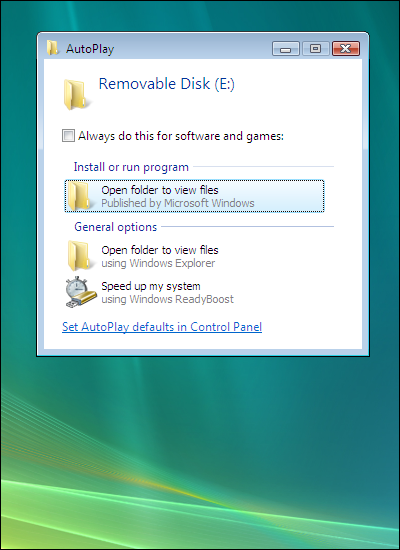
According to SANS Internet Storm Center, one of the reasons the worm is infecting so many machines is that “Conficker” uses multiple infection vectors:

  1. It exploits the MS08-067 vulnerability,
  2. It brute forces Administrator passwords on local networks and spreads through ADMIN$ shares and finally
  3. It infects removable devices and network shares by creating a special autorun.inf file and dropping its own DLL on the device.

Characteristics -

When executed, the worm copies itself using a random name to the %Sysdir% folder.

(Where %Sysdir% is the Windows system folder; e.g. C:\Windows\System32)

It modifies the following registry key to create a randomly-named service on the affected syetem:

  • HKEY_LOCAL_MACHINE\SYSTEM\CurrentControlSet\Services\{random}\Parameters\”ServiceDll” = “Path to worm”
  • HKEY_LOCAL_MACHINE\SYSTEM\CurrentControlSet\Services\{random}\”ImagePath” = %SystemRoot%\system32\svchost.exe -k netsvcs

Attempts connections to one or more of the following websites to obtain the public ip address of the affected computer.

  • hxxp://www.getmyip.org
  • hxxp://getmyip.co.uk
  • hxxp://checkip.dyndns.org
  • hxxp://whatsmyipaddress.com

Attempts to download a malware file from the remote website: (Rogue Russian site is up but not serving file anymore)

  • hxxp://trafficconverter.biz/[Removed]antispyware/[Removed].exe

Starts a HTTP server on a random port on the infected machine to host a copy of the worm.

Continuously scans the subnet of the infected host for vulnerable machines and executes the exploit. If the exploit is successful, the remote computer will then connect back to the http server and download a copy of the worm.

Later variants of w32/Conficker.worm are using scheduled tasks and Autorun.inf file to replicate on to non vulnerable systems or to reinfect previously infected systems after they have been cleaned.

Suggestions -

  1. Disable AutoPlay in your environment.
  2. Run a good security suite.
  3. Keep your computer updated with the latest patches.
  4. Be PROACTIVE and look for the worm in your environment.

Sources:

http://www.nai.com

http://www.symantec.com

http://www.f-secure.com

http://isc.sans.org

    Written by Jose Vicente Ortega

    January 22nd, 2009 at 1:27 pm

    Keeping The Network Clean

    without comments

    In today’s environment of mobile computing and the increasing integration of consumer electronics with the corporate network, it has become a necessity to plan accordingly in order to mitigate the risk this presents.

    Whether it be an iPhone or guest laptop connecting via wireless or using an unused network port, brings new challenges to network administrators who need, not only be aware of what is on their network but also prevent an un-managed device from infecting other devices on the network.

    The situation grows in complexity in higher education where the inherent open network environment becomes a juggling act balancing network security and open access. Students do not patch and fail to run current anti-virus.

    Network Access Control, which is more commonly referred to by the acronym NAC, is the most hyped term in networking today. It’s also one of the least understood.

    Network Access Control (NAC) is a computer networking solution that uses a set of protocols to define & implement a policy that describes how to secure access to a network nodes by devices when they initially attempt to access the network[citation needed]. NAC might integrate the automatic remediation process (fixing non-compliant nodes before allowing access) into the network systems, allowing the network infrastructure such as routers, switches and firewalls to work together with back office servers and end user computing equipment to ensure the information system is operating securely before interoperability is allowed.

    The idea behind Network Access Control (NAC) is to implement a set of pre-admission rules and post-admission controls over where users can go and what they can do. Kind of like an in-versed firewall framework on steroids.

    What’s important to understand is the Network Access Control (NAC) is not a device or appliance that is dropped in on the network, but rather a structure that needs to be deployed throughout the enterprise network.

    The goals that Network Access Control aims to address can be distilled into three categories.

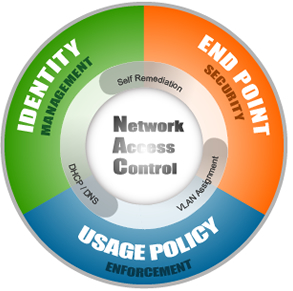
    1. Identity Management – Which includes device registration, authentication and role based access.
    2. Endpoint Compliance – The ability to prevent devices that lack anti-virus, patches or host prevention software from accessing the corporate network to prevent putting other computers at risk.
    3. Policy Enforcement – Provides the ability to enforce company-specific policies in either block, notify or report mode and integration with other solutions to identify and disable unauthorized activities.

    Different vendors take different approaches in order to accomplish these goals, were policies are enforced on a pre-admission vs. a post-admission basis, software clients are installed on the users computer vs. scanning those computers in an effort to gather information to automate decision making at the time the policy is enforced, and finally out-of-band vs. in-line solutions.

    In 2005 I started experimenting with Network Access Control technology and came across an open-source solution called NetReg.

    NetReg is an in-line, pre-admission, client-less Network Access Control solutions. The system sits between the users and the network. Identity management is accomplished by authenticating the user through a website against an LDAP server and storing in a database the username, the IP address assigned and the devices MAC address.

    Endpoint compliance is achieved by 2 dynamic DHCP address pools; one for unregistered (unknown hosts) with non-routable IP addresses (network/Internet blocked) and the second for registered (known hosts) with routable IP addresses (network/Internet accessible). A bogus DNS server prevents users from accessing anything but certain websites where a user can download anti-virus and patches for remediation purposes.

    Nessus vulnerability scanning software periodically scans devices to determine if these should be quarantined until they have met the established acceptable use policy. If a computer in the unregistered network is found to be non-compliant, it is notified and only when appropriate action has been taken will the computer be assigned a valid routable IP address. If the computer has already been assigned a valid IP address then it is blocked.

    Some of the shortfalls of this approach were the inability to determine which patches were missing and firewalled clients are not checked.

    Netreg which was originally developed by Southwestern University at Georgetown branched out into several versions and currently the only one being maintained is by Carnegie Mellon here.

    Finally is important to note that there is no silver bullet when it comes to security and there are always ways to get around a system. A thought that came to mind was how these products deal with printers, VoIP phones, gaming consoles, etc, when it comes to registration and how by changing one’s MAC address to mimic a VoIP phone or printer vendor would bypass the authentication.

    In researching when writing this blog, I came across another open source solutions started in 2007 called PacketFence which I will take a closer look at.

    Major Commercial Solutions:

    Open Source Solutions:

    Sources:

    Wikipedia
    Gartner Market Scope for NAC 2008

    Written by Jose Vicente Ortega

    January 22nd, 2009 at 11:50 am

    Nortel Files for Bankruptcy

    without comments

    Unfortunately Nortel was unable to do what it needed to do to stay in business and has filed for bankruptcy, as I noted in a post 4 months ago. Nortel Struggles Continue.

    The century-old company, North America’s biggest maker of phone gear and worth about $250 billion at its peak in 2000, fell victim to reduced spending by customers such as Verizon Communications Inc. and competition from Cisco Systems Inc. The company made the filing a day before a $107 million interest payment was due and was granted protection in Ontario Superior Court today.

    Chief Executive Officer Mike Zafirovski came to the company in 2005 tasked with turning around a business weighed down by a $3.2 billion accounting fraud and ensuing customer losses. Instead, Nortel has lost almost $7 billion since he took over as the company’s competitive position deteriorated further.

    “Nortel must be put on a sound financial footing once and for all,” said Zafirovski, who insisted the company will continue to meet the needs of its existing customers.

    The future survival of Nortel, however, is far from certain. Companies that exit the bankruptcy process often emerge in smaller form and are frequently acquired in part or whole by larger suitors looking for a good deal.
    “Nortel still has valuable assets,” said analyst Ronald Gruia of the market-research firm Frost & Sullivan. “They are probably going to wait until they have their house in order before they do a disposal.”
    Even if the company remains independent, Nortel is unlikely to recapture any semblance of its glory days. The networking industry, jolted earlier this decade by the rise of low-cost Asian vendors, is intensely competitive. What’s more, the phone industry has undergone massive consolidation, giving the few remaining carriers greater leverage over their suppliers.

    Sources:

    MarketWatch
    CBS NEWS Canada

    Written by Jose Vicente Ortega

    January 14th, 2009 at 1:26 pm

    Posted in Business

    Tagged with , , ,

    Sample Blackberry Enterprise Server Policy

    without comments

    The policy below provides an example of security measures that should be taken towards protecting a corporate network from the threats presented by mobile devices.

    These configurations and options should be “taken with a grain of salt”; as a guideline to what features should be set to mitigate the risk of smart-phone being used as un-metered gateways into the corporate network.

    The 5-step process should be put into action to address security issues related to smart-phones.

    1. Identify threats and vulnerabilities.
    2. Measure the risk.
    3. Determine what control should be put in place.
    4. Implement industry best practices and standards.
    5. Develop and communicate policy and awareness.

    THE SAMPLE POLICY:

    Device-Only Items:

    Password Required: True
    Allow Peer-to-Peer Messages: False (This can be set to be audited if enabled)
    Minimum Password Length: 4
    User Can Disable Password: False
    Maximum Security Timeout: 5
    Maximum Password Age: 180
    User Can Change Timeout: False
    Password Pattern Checks: (used to enforce complexity in passwords)
    Enable Long-Term Timeout: True
    Allow SMS: False (These can be set be audited if enabled)
    Enable WAP Config: False

    Desktop-Only Items:

    Show Application Loader: False
    Force Load Count: 0
    Auto Backup Enabled: True
    Auto Backup Include All: True
    Do Not Save Sent Messages: False

    Common Policy Group:

    Lock Owner Info: Lock Information Text
    IT Policy Notification:
    Set Owner Info: (If found please return to message……)
    Disable MMS: True

    Password Policy Group:

    Set Password Timeout: 20
    Set Maximum Password Attempts: 5
    Suppress Password Echo: True
    Maximum Password History: 3

    Security Policy Group:

    Disable Untrusted Certificate Use: True
    Disabled Revoked Certificate Use: True
    Disable Peer-to-Peer Normal Send: True
    Disable Key Store Low Security: True
    Certificate Status Cache Timeout: 1
    Disallow Third Party Application Download: True
    Force Lock When Holstered: True
    Allow Third Party Apps to Use Serial Port: False
    Disable Invalid Certificate Use: True
    Disable Weak Certificate Use: True
    Disable Key Store Backup: True
    Certificate Status Maximum Expiry Time: 4
    Disable Stale Status Use: True
    Disable Cut/Copy/Paste: True
    Disable Radio When Cradled: True
    Disable Forwarding Between Services: True
    Disabled Unverified CRLs: True
    Disable 3DES Transport Crypto: False
    Disable Persisted Plain Text: True
    Disable Unverified Certificate use: True
    Disable IP Modem: True
    Allow Smart Card Password Caching: False

    SMIME Application Policy Group:

    SMIME Minimum Strong RSA Key Length: 1024
    SMIME Minimum Strong DH Key Length: 1024
    SMIME Minimum Strong ECC Key Length: 163
    SMIME Allowed Content Ciphers: AES (256-bit), Triple DES
    SMIME Minimum Strong DSA Key Length: 1024

    Memory Cleaner Policy Group:

    Memory Cleaner Maximum Idle Time: 10
    Force Memory Cleaner When Holstered: True

    TLS Application Policy Group:

    TLS Disable Weak Ciphers: Disable weak ciphers
    TLS Disable Untrusted Connection: Disable untrusted connections
    TLS Minimum Strong RSA Key Length: 1024
    TLS Minimum Strong DH Key Length: 1024
    TLS Minimum Strong ECC Key Length: 163
    TLS Disable Invalid Connection: Disable invalid connections
    TLS Minimum Strong DSA Key Length: 1024
    TLS Device Side Only: False

    WTLS Application Policy Group:

    WTLS Disable Weak Ciphers: Disable weak ciphers
    WTLS Disable Untrusted Connection: Disable untrusted connections
    WTLS Minimum Strong RSA Key Length: 1024
    WTLS Minimum Strong DH Ley Lenth: 1024
    WTLS Minimum Strong ECC: 163
    WTLS Disable Invalid Connection: Disable invalid connections

    Browser Policy Group:

    Allow BIS Browser: False

    PIM Sync Policy Group:

    Disable PIN Messages Wireless Sync: False
    Disable SMS Messages Wireless Sync: False

    Desktop Policy Group:

    Desktop Password Cache Timeout: 10
    Desktop Allow Desktop Add-ins: False
    Desktop Allow Device Switch: False

    Locking Down The Blackberry Network

    Auditing SMS and PIN Messages on a BES

    Written by Jose Vicente Ortega

    January 11th, 2009 at 3:15 pm

    Posted in Security

    Tagged with , , , , ,

    Locking Down The Blackberry Network

    without comments

    Early last year India threatened to discontinue Blackberry service if Research In Motion (RIM), the company behind the Blackberry did not allow the Indian Government to monitor the Blackberry network traffic raising serious security concerns. Here are a few articles from PCWorld, InfoWorld, and CNet.

    Now president-elect Barack Obama vows to keep his Blackberry despite hacking fears and concerns by the Secret Service.

    This will not only be a headache for the Secret Service but its pretty likely that hacking attempts towards the RIM network will increase exponentially.

    Generally people just don’t think about the risk that a smart-phone poses, specially if its connected to a Blackberry Enterprise Server. How could my phone be a risk to anyone? Well a smartphone is not just a phone, but rather a miniature computer that is not just capable of making calls but it also an un-metered gateway into the corporate network.

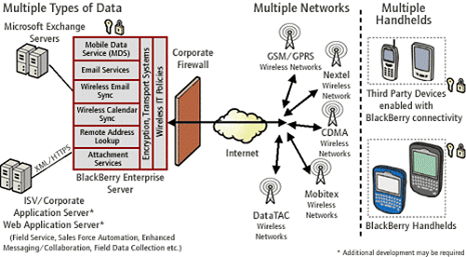
    In order to understand what actions to take to protect a smart-phone, in particular the Blackberry you have to understand how it works and how it interacts with the Blackberry Enterprise Server.

    Vulnerabilities:

    • Lack of authentication
    • Lack of encryption
    • Lack of mobile code execution controls
    • Difficult to enforce controls
    • Peripheral devices introduce additional vulnerabilities
    • Infrastructure vulnerabilities service specific operating systems, platforms, applications, etc.
    • Small size is prone to theft and loss
    • All devices may not be corporate owned
    • Multiple configurations of the Blackberry Enterprise Server (BES) architecture
    • Limited centralized update mechanisms
    • Limited IT/CIO Control

    Sources of Recommended Controls and Security Guidelines:

    • The Vendor (Microsoft, Treo, RIM, etc.)
    • SANS (www.sans.org)
    • NIST has a great publication
    • Other existing guidelines
    • 3rd Party Solutions often fill the gaps

    Once the vulnerabilities have been identified we proceed to implement controls and audits.

    Controls:

    Controls will include policies, standards, practices, procedures, guidelines, awareness, authentication, encryption, and asset management.

    Audits:

    Once the scope has been defined, allow to review the implementation of policies between the BES, servers, Blackberry devices, and Blackberry desktop agents. Audits also allow the review of configuration and options to ensure that security is not just available but implemented. Additionally configurations pushed down to end devices need to be audited as well.

    The infrastructure design and configuration of network components (firewalls, routers, switches, VLANs, etc.) will need to be audited as they play an intricate part of the overall security of the system.

    Risk Assessment:

    Although this requires additional resources and expertise, its a must in certain environments like corporate or government. A risk assessment will identity security vulnerabilities and provide a 2nd chance to identify all “assets”.

    Once this has been completed, validating the risk by performing an “ethical hack” will remove any uncertainty by proving the vulnerabilities identified actually exist.

    Conclusion:

    Providing documentation on the findings is vital. The documentation required will contain an executive summary, action items and details for system administrators, and a clear and concise report with both the good and the bad findings.

    A couple of things that should not fall through the cracks are ensuring that the corrective actions are implementable within the organization and the next audit scheduled.

    Sample Policy:

    Sample Blackberry Enterprise Server Policy

    Written by Jose Vicente Ortega

    January 11th, 2009 at 3:02 am

    Come Get The Key – French Game Show

    without comments

    L’épreuve des seins dans fort boyard.


    Written by Jose Vicente Ortega

    January 8th, 2009 at 1:21 pm

    Posted in Misc

    Tagged with